
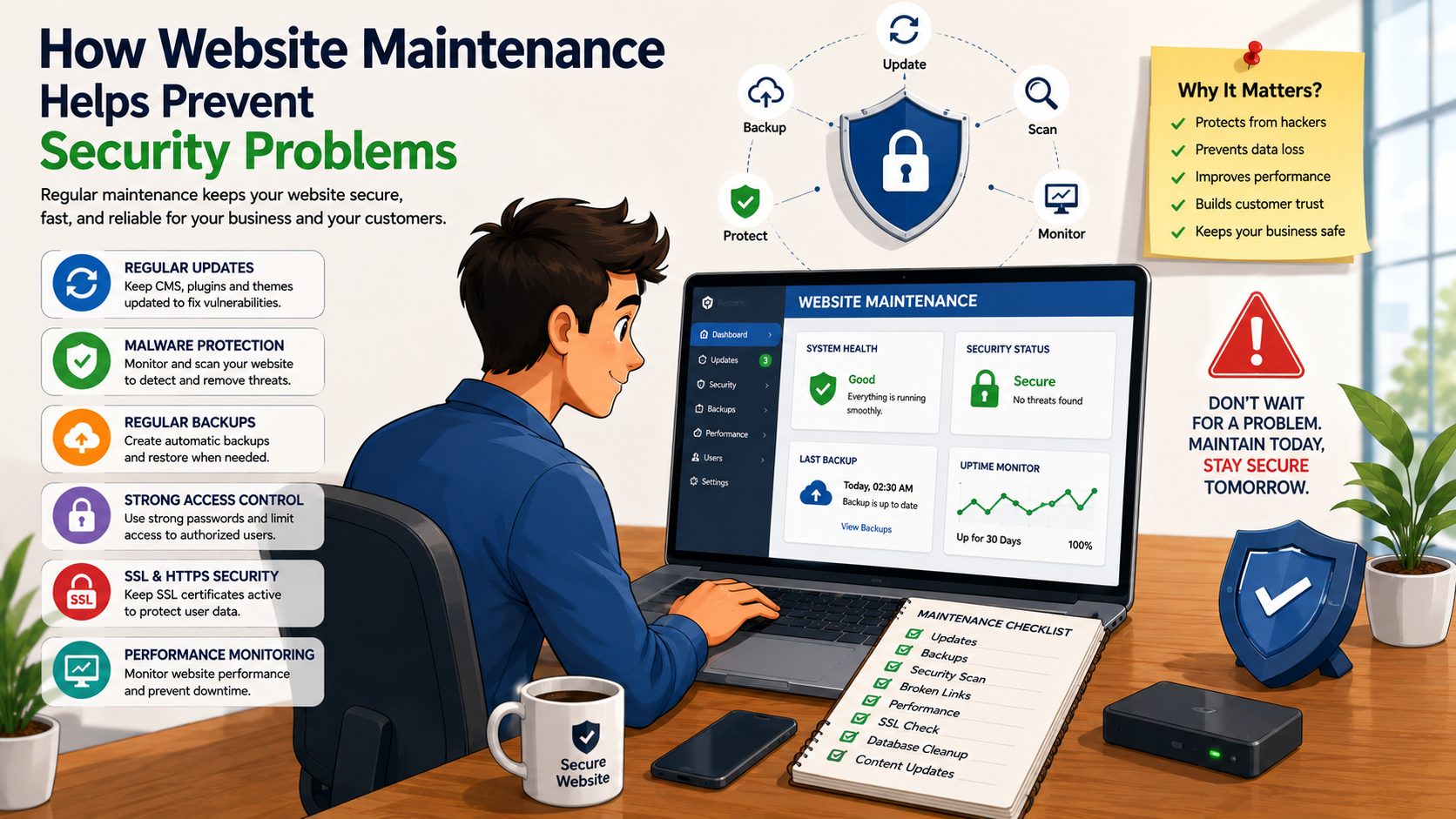
Your website is an important part of your business. It helps customers learn about your services, submit enquiries, make purchases, and communicate with your company. However, an outdated or poorly maintained website can become vulnerable to security problems.
Regular website maintenance helps businesses keep their websites updated, secure, and reliable. From software updates and backups to security monitoring and access management, ongoing maintenance can reduce security risks and help protect your website and business data.
What Is Website Security Maintenance?
Website security maintenance is the ongoing process of protecting a website from vulnerabilities, unauthorized access, malware, data loss, and other technical threats.
It can include:
· Software and plugin updates
· Security monitoring
· Malware detection
· Regular backups
· SSL/HTTPS checks
· Password and access management
· Database maintenance
· Vulnerability checks
· Security configuration reviews
· Website performance monitoring
Security should not be treated as a one-time task. As websites, software, and security threats change over time, regular maintenance becomes essential.
Why Website Maintenance Is Important for Security
1. Keeps Software and Plugins Updated
Websites often depend on content management systems, themes, plugins, libraries, and other software components.
Older versions may contain known security vulnerabilities. Regular maintenance ensures that available security updates are reviewed and applied appropriately.
For websites using multiple plugins or integrations, updates should be tested to avoid compatibility problems.
2. Helps Protect Against Malware
Malware can affect websites in different ways. A compromised website may display unwanted content, redirect visitors, or behave unexpectedly.
Regular security monitoring can help identify suspicious activity and allow problems to be addressed earlier.
Maintenance activities can include:
· Malware scanning
· File monitoring
· Suspicious activity checks
· Security log reviews
· Removing unwanted files
3. Protects Customer and Business Information
Business websites may handle information such as:
· Customer names
· Contact details
· Enquiry information
· Account information
· Order details
A properly maintained website helps reduce the risk of security weaknesses affecting this information.
Businesses should also make sure that forms, databases, integrations, and access controls are configured appropriately.
4. Ensures SSL and HTTPS Are Working
SSL helps establish an encrypted connection between a visitor's browser and the website.
A website using HTTPS helps protect information transmitted between users and the website.
Regular maintenance should include checking:
· SSL certificate validity
· HTTPS configuration
· Secure page access
· Mixed-content issues
Keeping HTTPS properly configured also helps provide customers with greater confidence when interacting with your website.
5. Creates Reliable Website Backups
Even with security precautions, technical problems can occur.
A reliable backup strategy provides an additional layer of protection if your website experiences:
· Malware infection
· Accidental data deletion
· Failed software updates
· Server problems
· Website errors
· Security incidents
Backups should be performed regularly and stored securely. It is also important to periodically verify that backups can actually be restored.
6. Reduces the Risk of Unauthorized Access
Weak passwords and unnecessary user accounts can increase security risks.
Regular maintenance should include reviewing:
· Administrator accounts
· User permissions
· Password policies
· Unused accounts
· Login security
· Access to hosting and website management systems
Only people who need administrative access should have it.
7. Helps Identify Vulnerabilities Early
Security problems can become more difficult to resolve when they are ignored for long periods.
Regular website checks can identify potential issues before they become major problems.
A maintenance team can review:
· Outdated components
· Suspicious files
· Broken security configurations
· Unused plugins
· Vulnerable software
· Unusual website activity
Early identification can make security issues easier to manage.
8. Keeps Third-Party Integrations Secure
Modern websites often connect with external services such as:
· Payment gateways
· Email platforms
· CRM systems
· ERP systems
· Analytics tools
· Marketing platforms
These integrations need to be monitored to ensure they continue working securely.
API credentials, access tokens, plugins, and connected services should be reviewed and updated when necessary.
9. Helps Prevent Data Loss
Security is not only about preventing unauthorized access. Protecting your business from data loss is equally important.
Regular maintenance can combine:
Security Monitoring + Backups + Updates + Recovery Planning
This provides a stronger approach to protecting important website information.
10. Keeps Your Website Reliable for Customers
A security incident can affect more than your website. It can also affect customer trust.
If visitors encounter:
· Security warnings
· Redirects to unwanted websites
· Broken pages
· Suspicious pop-ups
· Unavailable pages
they may hesitate to interact with your business.
Regular maintenance helps keep the website stable, functional, and trustworthy.
Common Website Security Problems
Businesses should be aware of common website security issues such as:
· Outdated plugins and software
· Weak passwords
· Unauthorized user accounts
· Malware
· Poor access controls
· Unsecured forms
· Expired SSL certificates
· Vulnerable third-party integrations
· Lack of regular backups
· Unmonitored website changes
Regular maintenance can help businesses identify and address many of these issues.
Website Security Maintenance Checklist
A professional website maintenance routine can include:
· ✅ Update CMS software
· ✅ Update plugins and themes
· ✅ Monitor for malware
· ✅ Check SSL certificate
· ✅ Maintain regular backups
· ✅ Test backup restoration
· ✅ Review administrator accounts
· ✅ Remove unused plugins and software
· ✅ Check website files
· ✅ Monitor suspicious activity
· ✅ Review third-party integrations
· ✅ Check website forms
· ✅ Monitor website availability
· ✅ Review security settings
How Often Should Website Security Be Checked?
The required frequency depends on the type of website.
A simple business website may require regular monthly maintenance, while websites handling payments, customer accounts, or large amounts of data may require more frequent monitoring.
Important security updates should be reviewed as soon as they become available, rather than waiting for a scheduled maintenance cycle.
Website Maintenance Is Better Than Waiting for a Security Problem
Many businesses only think about website security after something goes wrong. By that point, recovering the website may require additional time and expense.
A proactive maintenance approach focuses on prevention and early detection.
Instead of:
Problem → Website Down → Emergency Fix
businesses can aim for:
Monitor → Update → Backup → Secure → Maintain
This approach can help reduce avoidable security risks and keep the website operating reliably.
Why Choose Mugin Technologies for Website Maintenance?
At Mugin Technologies, we help businesses maintain their websites with a focus on security, performance, reliability, and ongoing support.
Our website maintenance services can include:
· Website security monitoring
· Software updates
· Plugin and theme updates
· Website backups
· Malware monitoring
· SSL/HTTPS checks
· Performance optimization
· Technical troubleshooting
· Content updates
· SEO maintenance
· Ongoing website support
We help businesses keep their websites secure, updated, and ready to serve their customers.